
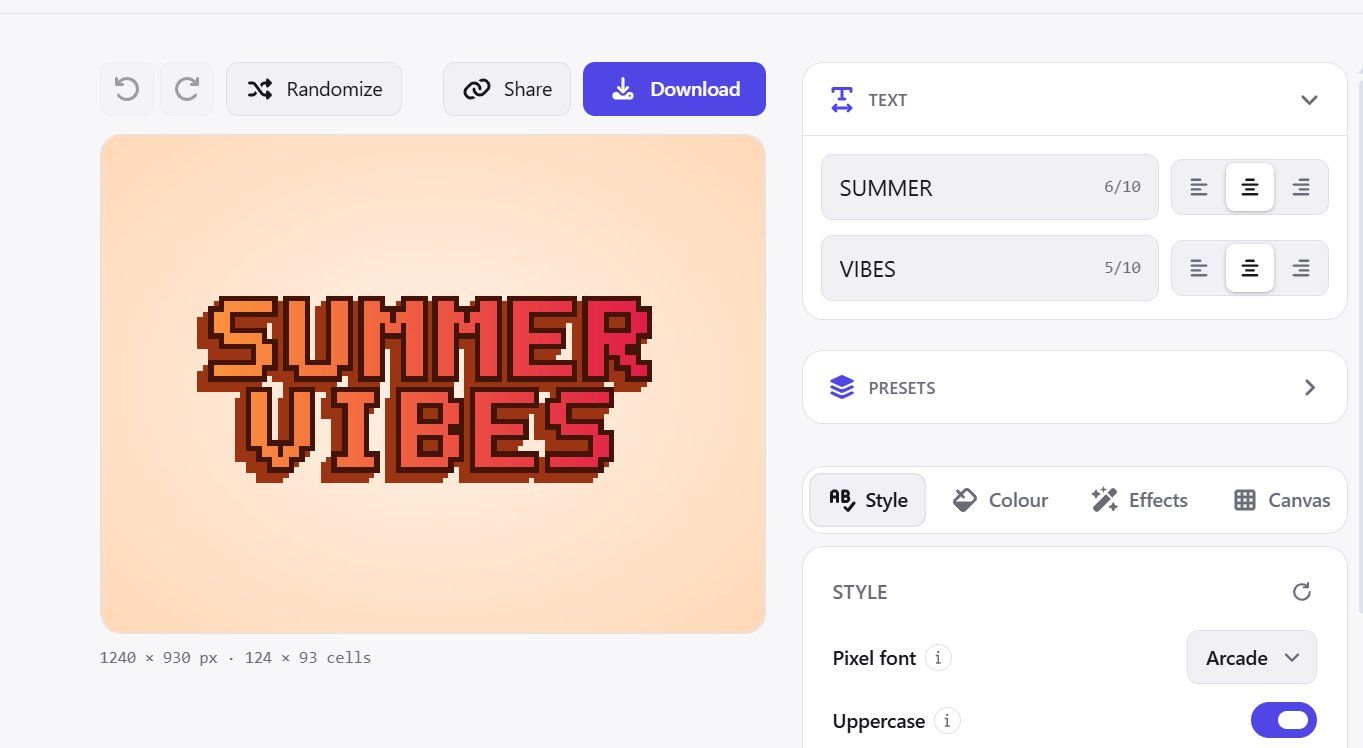
TextToPixelArt: turn any text into crisp, retro pixel art in seconds. Free, no sign-up, right in your browser.
TextToPixelArt turns words into pixel art. Type up to two lines, choose one of four hand-drawn pixel fonts (Arcade, Thin, Rounded, Condensed), and style it with outlines, 3D extrusion, glow, drop shadows, highlights, gradients, or a different colour for each letter. The preview updates as you type.
Every effect is drawn on the same pixel grid as the letters, so there are no blurry edges or half-pixels. What you see is exactly what you download: PNG at 1×, 2×, 4× or 8× with an optional transparent background, JPG, or a clean, compact SVG that scales to any size.
Not sure where to start? Pick from 100 ready-made templates, apply a preset, or hit randomize, then fine-tune from there. Undo covers your last 50 changes. Your whole design is saved in the page link, so sharing it is just sending the URL. It all runs in your browser: no account, no uploads, no watermark.
Where it's useful: - Game developers: title screens, "GAME OVER" and "LEVEL UP" banners, HUD labels, itch.io page headers - Streamers & YouTubers: retro overlays, channel banners, thumbnail text - Designers & indie makers: 8-bit logos, wordmarks, landing-page hero art - Social media: eye-catching posts, profile headers, Discord server banners and emotes - Merch & print: stickers, t-shirts and posters, using the scalable SVG export - Hobbyists & teachers: a quick, fun way to learn how pixel fonts are built
Frequently asked questions
What is TextToPixelArt?
TextToPixelArt is a design tool. Text to Pixel Art Generator — Free Pixel Art Font Maker.
Is TextToPixelArt free?
Yes, TextToPixelArt is free to use.
What can you do with TextToPixelArt?
TextToPixelArt covers Converts typed text into pixel art using four hand-drawn fonts, Styling options like outlines, 3D extrusion, glow, shadows, gradients and Exports to PNG (multiple resolutions), JPG, and scalable SVG.
More in Design
Figma is the canvas where design, code, and AI come together. From first idea to shipped product: go from concept to production with your whole team, in one pl
The easiest way for non-designers to make things look professionally designed, fast.
The aesthetic gold standard of AI image generation, if you're willing to pay and learn its quirks.
Create a professional website with Framer’s no-code AI website builder. Design freely, manage CMS content, optimize SEO, collaborate, and publish fast.
Use AI as your design ally, not as a replacement. Effortlessly generate sitemaps and wireframes for marketing websites in minutes with Relume’s AI website build

Download design elements for free: icons, photos, vector illustrations, and music for your videos. All the assets made by designers → consistent quality ⚡️
No comments yet. Be the first to say something useful.